Learn how to deploy Salesforce Data 360 metadata reliably. This practical guide covers DevOps Data Kits, CLI & Change Set paths, the Deploy Data Kit Components flow, Data Space prerequisites, dependency sequencing, permission gotchas, common failures, and full checklists.
If you’ve ever tried moving Data 360 components from sandbox to production and ended up with missing streams, inactive connectors, or broken segments, you’re not alone. Data 360 deployment is fundamentally different from standard Salesforce metadata work. It’s a graph-based problem that requires both metadata movement and explicit runtime activation.
In this guide we’ll cover the complete process end-to-end — from understanding what you’re actually moving, through the two-layer deployment model, DevOps Data Kit best practices, the exact publishing sequence, permission limitations, and the post-deployment activation step that most teams miss. Everything is written so you can follow it whether you use Salesforce CLI, Change Sets, or a DevOps tool.
What is Salesforce Data 360 (Data Cloud)?
Salesforce Data 360 (formerly known as Data Cloud) is Salesforce’s data platform used for ingestion, harmonization, identity resolution, calculated insights, segmentation, activation, and AI/data use cases. It enables organizations to unify customer data from multiple sources into a single source of truth, build unified customer profiles, create segments and audiences, calculate insights (such as lifetime value or engagement scores), and activate that data to downstream systems and marketing/advertising destinations.
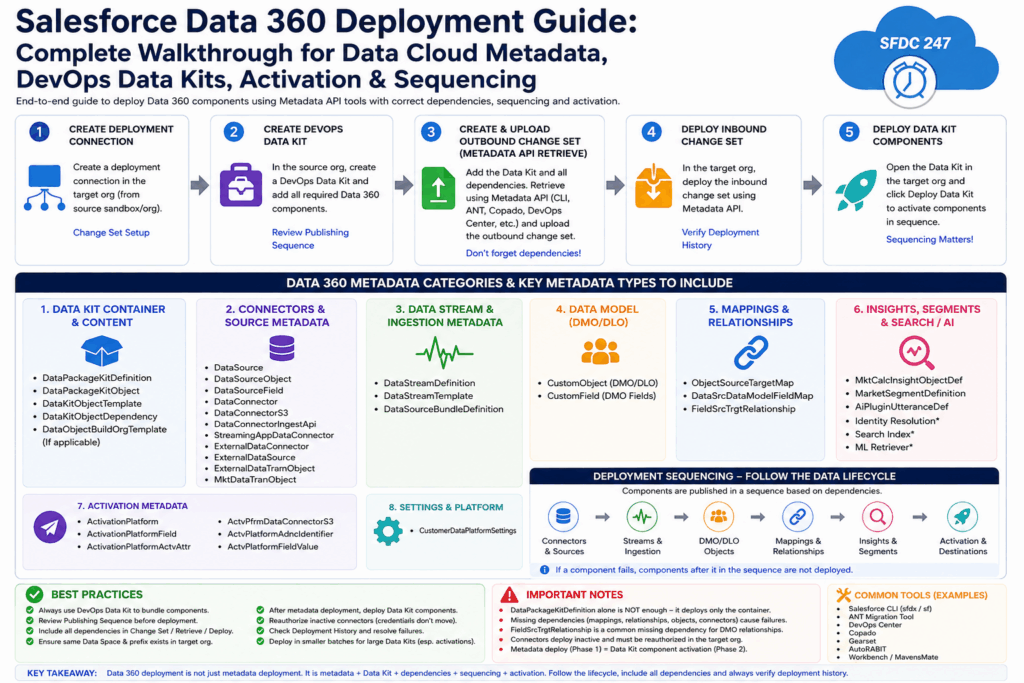
Unlike traditional Salesforce objects and metadata, Data 360 components are heavily dependent on each other, frequently grouped inside DevOps Data Kits, often require target-environment prerequisites (especially Data Spaces), and may require explicit runtime activation after metadata deployment. This makes deployment significantly more complex than standard metadata movement for Apex, Flows, or Custom Objects.
Key Definitions You’ll See Throughout This Guide
Here are the terms that appear again and again when you work with Data 360 deployments:
- Data 360 / Data Cloud — Salesforce’s data platform for ingestion, harmonization, identity, calculated insights, segmentation, activation, and AI use cases.
- Data Kit — A container construct for Data 360 metadata. The top-level definition is DataPackageKitDefinition.
- DevOps Data Kit — The specific Data Kit type built for moving metadata and process definitions across environments (sandbox → production or between production orgs via a sandbox path).
- Standard Data Kit — Used for packaging and installation scenarios. Standard and DevOps Data Kits are not interchangeable when updating the same objects.
- DataPackageKitDefinition — The Metadata API type that represents the Data Kit container itself. It’s the “box,” not necessarily everything inside it.
- DataPackageKitObject — Metadata type for content objects that live inside a Data Kit.
- DLO (Data Lake Object) — Container for raw or normalized ingested data inside Data 360.
- DMO (Data Model Object) — Harmonized data model object. These often appear in metadata as CustomObject / CustomField.
- Data Stream — Ingestion pipeline that defines connection, API, file retrieval, or source settings.
- Calculated Insight — Aggregation or calculation definition (represented by MktCalcInsightObjectDef).
- Segment — Audience definition (represented by MarketSegmentDefinition).
- Activation — Process and metadata for sending segment or audience data to external platforms (S3, advertising destinations, etc.).
- Direct Deploy — Tool-supported deployment of selected individual Data 360 metadata types without first adding them to a Data Kit (supported only for certain types).
- Deploy Data Kit Components Flow — The REST-triggered flow (sfdatakit__DeployDataKitComponents) that actually deploys or activates components inside the Data 360 runtime after metadata has landed.
The Two-Layer Deployment Model (This Is the Key Insight)
Data 360 deployment is not a flat metadata movement problem. It’s a graph-based deployment that needs two distinct layers:
Layer 1 – Metadata Movement Moves the XML/configuration definitions into the target org using Metadata API, Salesforce CLI, Change Sets, or similar tooling. Examples: DataPackageKitDefinition, DataPackageKitObject, DataSource, DataStreamDefinition, mapping metadata, CustomObject/CustomField for DMOs, etc.
Layer 2 – Data 360 Runtime Deployment / Activation Deploys or activates the actual components inside the Data 360 runtime. This happens via the Data Kit “Deploy” button, automatic Change Set behavior, or the sfdatakit__DeployDataKitComponents REST flow.
Simple formula: Data 360 deployment = Metadata movement + Dependency completeness + Target prerequisites + Runtime activation
Critical point: DataPackageKitDefinition is only the container. Deploying just the container definition almost always results in an empty or incomplete Data Kit in the target. You must retrieve and deploy the container plus all the related Data 360 metadata types it contains or depends on (DataPackageKitObject, DataKitObjectDependency, DataSource, DataStreamTemplate, mappings, relationships, etc.).
Data 360 Metadata Type Taxonomy
Salesforce exposes specific Metadata API types for Data 360. Here’s how they group for deployment purposes:
Activation Metadata
- ActivationPlatform, ActivationPlatformField, ActivationPlatformActvAttr, ActvPlatformFieldValue
- ActvPfrmDataConnectorS3 (S3 bucket and export directory)
- ActvPlatformAdncIdentifier (audience identifiers like email, phone, MAID, OTT ID)
Data Kit Metadata
- DataPackageKitDefinition (top-level container)
- DataPackageKitObject, DataKitObjectTemplate, DataKitObjectDependency
- DataObjectBuildOrgTemplate
Source and Connector Metadata
- DataSource, DataSourceObject, DataSourceField, DataSourceBundleDefinition
- DataConnector, DataConnectorS3, DataConnectorIngestApi, StreamingAppDataConnector
- ExternalDataConnector, ExternalDataSource, ExternalDataTranObject
Ingestion and Mapping Metadata
- DataStreamDefinition, DataStreamTemplate
- ObjectSourceTargetMap
- DataSrcDataModelFieldMap
- FieldSrcTrgtRelationship (very important for DMO relationships)
Model, Insights, Segmentation & AI Metadata
- CustomObject, CustomField (DMO/DLO representations)
- MktCalcInsightObjectDef (Calculated Insights)
- MarketSegmentDefinition (Segments)
- AiPluginUtteranceDef
- CustomerDataPlatformSettings
Deployability Categories – What You Can and Cannot Deploy Directly
| Component / Metadata Type | Typical Category | Individually Deployable? | Notes / Recommendations |
|---|---|---|---|
| DataPackageKitDefinition | Data Kit Container | No (as standalone) | Must include content objects and dependencies |
| DataPackageKitObject & related types | Data Kit | No | Always deploy together with the container |
| DataStreamTemplate, DataSourceBundleDefinition | Data Kit | No | Must be part of full Data Kit deployment |
| MktCalcInsightObjectDef (Calculated Insight) | Data Kit or Direct Deploy | Yes (selected tools) | Supported for Direct Deploy in some tools when dependencies exist |
| MarketSegmentDefinition | Data Kit | Generally No | Name must be unique in target |
| Identity Resolution, Search Index, ML Retriever | Data Kit or Direct Deploy | Yes (selected tools) | Pilot/selected support – respect dependencies |
| DataStreamDefinition, DataSource*, mappings, relationships | Data Kit (recommended) | Generally No | Use full Data Kit manifest for reliable results |
| ActivationPlatform* types | Data Kit | No | Include with segment and destination metadata |
| sfdc_a360_sfcrm_data_extrac (CRM Connector Permission Set) | Not Metadata API | No | Manually create/configure in target org |
Golden rule: Never assume that selecting only DataPackageKitDefinition will move the complete Data Kit and all its contents.
Critical Prerequisites Before You Deploy Anything
Data Space Prerequisite (Most Common Failure Point) Data Spaces are a manual prerequisite. The target org must already contain a Data Space with the exact same prefix as the source Data Space. Salesforce documentation is clear: if a Data Space exists in the sandbox but not in production, you must create it manually in production before deploying components from that Data Space. The Data Space itself is not created by Data Kit deployment.
Rules:
- Same Data Space must exist in source and target with identical prefix.
- Prefix mismatch will break deployment or cause incorrect runtime behavior.
- Data Space creation through deployment is not supported.
Org and Feature Enablement
- Data 360 must be enabled and provisioned in both source and target orgs.
- Source org must have the feature metadata added to a DevOps Data Kit before retrieval.
- Matching Data Spaces with identical prefixes must exist in both environments.
Permissions and the Profile vs Permission Set Limitation
The deployment user needs both standard Salesforce deployment permissions and Data 360-specific access:
- API Enabled
- View Setup and Configuration
- Modify Metadata Through Metadata API Functions
- Customize Application
- Data Cloud Architect / Data 360 Admin / Data 360 Marketing Admin
- Connector Integration Permission Set (for Salesforce CRM ingestion)
Important limitation: DataStream permissions on Profiles cannot be deployed via Metadata API, even though you can change them manually in the UI. This creates a mismatch between UI behavior and deployability.
Recommended approach: Manage Data 360 permissions through Permission Sets or Permission Set Groups rather than Profiles.
| Profile Permission Area | Retrievable? | Deployable? | Operational Rule |
|---|---|---|---|
| Datastream | Yes | No | Manage through Permission Set |
| DataStreamTemplate / DataStreamDefinition | No | No | Do not rely on Profile metadata deployment |
| DataObjectCategory / DataModelTaxonomy | No | No | Use permission set or manual configuration |
If your Data Streams connect to a Salesforce source org, the Data 360 Salesforce Connector user also needs Object Read, View All Records, and Field Read Access on every mapped field.
Three Practical Deployment Paths
Path A – Salesforce CLI with DevOps Data Kit (Best for DevOps & Source Control)
- Authorize the relationship between source and target orgs.
- Create a Salesforce DX project with manifest/package.xml support.
- Authorize both sandbox and production (or other target) orgs.
- Create matching Data Spaces in both environments with identical prefix names.
- In the source sandbox, create a Data Kit of type DevOps and select the Data Space.
- Add Data Streams, DLOs, Calculated Insights, Data Graphs, Segments, Activations, and review the publishing sequence.
- Download the manifest (UI or get data kit manifest Connect REST API).
- Run: sf project retrieve start –manifest manifest/package.xml
- Commit everything to source control.
- Delete any KQ_* key qualifier files: cd force-app/main/default/objects && find . -name “KQ_*” -exec rm {} \;
- Deploy: sf project deploy start –manifest package.xml
- Resolve any failures (missing relationships, Data Space issues, connector problems).
- Activate/deploy components using the Data Kit UI or the sfdatakit__DeployDataKitComponents flow.
- Reauthorize any inactive connectors (credentials never copy).
- Verify in Data Cloud Setup → Data Kits → Deployment History.
Path B – Change Sets with DevOps Data Kit (Admin/UI-Friendly)
- Create a deployment connection in the target org for inbound Change Sets.
- Create a DevOps Data Kit in the sandbox (Type = DevOps, select Data Space).
- Ensure the matching Data Space prefix exists in the target.
- Add components to the kit and review Publishing Sequence.
- Create an outbound Change Set and add the Data Package Kit Definition component + use “View/Add Dependent Components” (scroll through all pages).
- For custom DMOs, add Field Source Target Relationship components.
- Remove any KQ_* files.
- Upload and deploy the Change Set.
- Check Data Cloud Setup → Data Kits → Deployment History.
- Note: The first Change Set deployment often auto-deploys components. Subsequent deployments of the same Data Kit may require a manual “Deploy Data Kit” click.
Path C – Direct Deploy of Selected Components Some tools support Direct Deploy for individual metadata types without manually adding them to a Data Kit. This is useful for small, precise changes when the component and its dependencies already exist in the target.
Commonly supported types (when the tool allows it): Calculated Insight, Identity Resolution, Machine Learning Retriever, Search Index.
Data Streams, DLOs, Data Source Objects, and most other types generally require the full Data Kit path. Direct Deploy still respects dependencies, Data Space requirements, and permissions.
Activating Components After Metadata Deployment
Metadata deployment only moves the configuration. You still need to deploy or publish the components inside the Data 360 runtime.
Salesforce provides a REST-triggered flow called sfdatakit__DeployDataKitComponents (available in REST API v61.0+).
Endpoint: POST /services/data/vXX.X/actions/custom/flow/sfdatakit__DeployDataKitComponents
Required inputs: dataKitNameInput and dataKitComponentsInput (collection of component payloads). dataKitDataSpaceInput is optional.
Here are practical payload examples:
Data Stream Bundle (CRM Connector)
JSON
{
  "inputs": [
    {
      "dataKitComponentsInput": [
        {
          "componentType": "DataStreamBundle",
          "bundleConfig": {
            "connectorType": "CRM",
            "bundleName": "CRMBundleTest",
            "forceNoRefresh": false,
            "bundleCRMConfig": {
              "orgId": "00DU200000051Q5"
            }
          }
        }
      ],
      "dataKitNameInput": "MyTestDatakit",
      "dataKitDataSpaceInput": "default"
    }
  ]
}
Calculated Insight
JSON
{
  "inputs": [
    {
      "dataKitComponentsInput": [
        {
          "componentType": "CalculatedInsight",
          "calculatedInsightsConfig": {
            "apiName": "crm",
            "apiNameOverride": "hello",
            "label": "lab",
            "publishInterval": "NotScheduled"
          }
        }
      ],
      "dataKitNameInput": "datakit1",
      "dataKitDataSpaceInput": "default"
    }
  ]
}
Data Lake Object
JSON
{
  "inputs": [
    {
      "dataKitComponentsInput": [
        {
          "componentType": "DataLakeObject",
          "dloConfig": {
            "dataSourceObjectDevName": "Account_A_New_DLO",
            "apiName": "Account_A_New_DLO",
            "label": "Account A New DLO"
          }
        }
      ],
      "dataKitNameInput": "datakit1",
      "dataKitDataSpaceInput": "default"
    }
  ]
}
Data Transform (Batch)
JSON
{
  "inputs": [
    {
      "dataKitComponentsInput": [
        {
          "componentType": "DataTransform",
          "dataTransformConfig": {
            "dataTransformType": "BATCH",
            "dataTransformDevName": "BatchTransformAccount",
            "apiName": "BatchTransformAccount",
            "label": "BatchTransformAccount"
          }
        }
      ],
      "dataKitNameInput": "datakit1",
      "dataKitDataSpaceInput": "default"
    }
  ]
}
The flow deploys components sequentially and waits for each component’s deployment status before moving to the next. The response contains a Flow_InterviewGuid you can use for tracking.
Recommended Deployment Order (Dependency-First)
Data 360 components are sequence-sensitive. Follow the data lifecycle:
- Permissions & Org Prerequisites
- Data Spaces (must exist with matching prefix)
- Connectors / Data Sources
- Source Objects / Source Fields
- Data Streams / Stream Bundles / Templates
- DLOs / DMOs / Custom Objects / Custom Fields
- Object + Field Mappings
- Field Source Target Relationships
- Identity Resolution / Data Graphs
- Calculated Insights
- Segments
- Activations
- Data Kit Metadata (container + objects)
- Data Kit Component Activation / Deployment
- Connector Reauthorization
- Deployment History Verification
Common Issues and How to Fix Them
| Issue | Typical Cause | Resolution |
|---|---|---|
| Data Kit deployed but content missing | Only DataPackageKitDefinition was selected | Retrieve and deploy container + all related metadata types |
| Data Stream / DLO not created | Missing dependencies or inactive connector | Use full DevOps Data Kit manifest |
| Missing FieldSrcTrgtRelationship errors | DMO relationship metadata omitted | Retrieve exact missing files from source |
| KQ_* key qualifier file errors | Key qualifier files included incorrectly | Delete KQ_* files before deployment |
| Inactive connectors after deployment | Credentials do not copy during metadata movement | Reauthorize connectors in target org |
| Data Space prefix mismatch | Target Data Space missing or different prefix | Manually create matching Data Space first |
| Profile DataStream permission failure | Trying to deploy via Profile (unsupported) | Use Permission Sets instead |
| Second Change Set does not deploy components | Same Data Kit already installed | Click “Deploy Data Kit” manually or use activation flow |
Packaging and Data Kit Update Rules
- Objects deployed using a Standard Data Kit can only be updated by modifying and redeploying the same Standard Data Kit.
- The same rule applies to DevOps Data Kits.
- Standard and DevOps Data Kits cannot be used interchangeably to update the same object.
- Manually created objects cannot necessarily be updated using a Data Kit.
- Data 360 metadata cannot be added to an unlocked package.
Generic Deployment Algorithm (Tool-Neutral)
- Authenticate to source and target with a user who has Metadata API and Data 360 deployment permissions.
- Validate Data 360 is enabled and provisioned in both orgs.
- Validate the target has a Data Space with the exact same prefix.
- Decide on deployment type (Data Kit + CLI, Change Set, or Direct Deploy).
- If using Data Kit: create/select DevOps Data Kit, add components, review publishing sequence.
- Retrieve or generate the Data Kit manifest.
- Build the deployment package including DataPackageKitDefinition + all related/dependent metadata types.
- Remove any KQ_* key qualifier files where required.
- Validate against prerequisites, permissions, connectors, and dependencies.
- Deploy the metadata.
- Trigger Data Kit component deployment/activation (UI or flow).
- Inspect Deployment History.
- Reauthorize inactive connectors.
- Retry only after fixing the first failed dependency in the sequence.
- Commit retrieved/deployed metadata to source control.
Pre-Deployment Checklist
- Data 360 enabled and provisioned in both orgs
- Deployment user has API Enabled, Modify Metadata Through Metadata API Functions, View Setup and Configuration, and Data 360 Admin/Architect permissions
- Target Data Space exists with identical prefix
- Data Kit type is DevOps (when using Data Kit path)
- All components added to Data Kit and publishing sequence reviewed
- Manifest downloaded/generated
- Dependencies selected / “View Add Dependent Components” used
- FieldSrcTrgtRelationship included for custom DMO relationships
- KQ_* files removed
- Profile DataStream permissions excluded from package
- Permission Sets prepared for Data 360 permissions
- Connector reauthorization plan ready
Post-Deployment Checklist
- Inbound Change Set / CLI deployment succeeded (check Deployment History)
- Data Kit exists in target org
- Data Kit components deployed/activated (Deployment History tab + component statuses)
- If same Data Kit redeployed via Change Set, click “Deploy Data Kit” if components did not auto-deploy
- Run activation flow where automated post-deploy activation is required
- Connectors are active (reauthorize any that are inactive)
- Data Streams visible and valid
- DLO/DMO mappings valid
- Calculated Insights and Segments valid
- Activation targets valid
- Permissions assigned through Permission Sets (not unsupported Profile deployment)
Frequently Asked Questions About Data 360 Deployment
Q1: Ensuring Correct Deployment Sequence When Using Metadata API-Based Tools
As a developer, you created Data 360 components in a source org, added them to a DevOps Data Kit, and now want to deploy to a target org using a Metadata API-based tool (Salesforce CLI, DevOps Center, or similar). Permissions exist. Since Metadata API deploys metadata as a package and does not let you explicitly control runtime publishing order of Data 360 components, how do you ensure the correct deployment sequence is maintained?
Answer: You do not control Data 360 sequencing by simply ordering metadata XML files inside package.xml. For Data 360, the correct approach is: Use DevOps Data Kit publishing sequence + generated manifest + dependency-complete Metadata API deployment + post-deployment Data Kit component deployment/activation.
Metadata API moves the metadata. The Data Kit / Data 360 deployment layer handles the actual component publishing sequence. Salesforce documentation states that feature metadata must first be added to a DevOps Data Kit, then the Data Kit manifest is downloaded and used to retrieve/deploy the related metadata. A separate Deploy Data Kit Components flow/API deploys components sequentially in the target org.
Step-by-step approach:
- Create the DevOps Data Kit in the source org and add all required Data 360 components (Data Streams, Data Sources, DLOs/DMOs, mappings, relationships, Calculated Insights, Segments, Activations, and Data Kit metadata).
- Review the Data Kit publishing sequence inside the Data Kit. This is your primary control point for logical order (follow the dependency-first order documented earlier).
- Download the Data Kit manifest (UI: Data Kits > Download Manifest, or via Get Data Kit Manifest Connect REST API). Do not manually create a random package.xml unless you fully understand all dependencies.
- Retrieve using the generated manifest with your Metadata API tool (sf project retrieve start –manifest manifest/package.xml). The goal is to retrieve the Data Kit plus all related Data 360 metadata, not only DataPackageKitDefinition.
- Validate dependencies before deployment — ensure DataPackageKitObject, DataKitObjectDependency, DataSource*, DataStream*, mapping metadata (ObjectSourceTargetMap, DataSrcDataModelFieldMap), FieldSrcTrgtRelationship, CustomObject/CustomField, and activation metadata are included as applicable.
- Deploy the metadata package using your chosen tool. This is Phase 1 only (configuration metadata placement).
- Trigger Data Kit component deployment/activation in the target org using the Data Kit UI (Deploy Data Kit) or the sfdatakit__DeployDataKitComponents REST flow. This step enforces actual runtime sequencing.
- Monitor Deployment History in Data Cloud Setup > Data Kits > Deployment History. If a component fails, later components in the sequence are not deployed. Fix the failed dependency and retry.
What not to do: Do not assume manually ordering DataSource, then DataStream, then DMO, then CalculatedInsight in package.xml will control runtime behavior. Metadata API deploys a metadata package; it does not provide Data 360 runtime orchestration. Proper sequence orchestration belongs to the DevOps Data Kit Publishing Sequence + Deploy Data Kit Components flow + Deployment History validation.
Q2: Which Metadata Types Will You Include in the Deployment Package? (Interview-Style Question)
Question: As a developer, you created Salesforce Data Cloud / Data 360 components in a source org and added them to a DevOps Data Kit. Now you want to deploy them to a target org using a Metadata API-based tool such as ANT, DevOps Center, Copado, AutoRABIT, Gearset, Workbench, or Salesforce CLI. Permissions already exist. Which metadata types will you include in the deployment package? Explain using 3–4 practical use cases, and then give a generic final checklist for any Data 360 deployment.
Answer The most important rule is: Do not deploy only DataPackageKitDefinition. DataPackageKitDefinition represents the top-level Data Kit container, but it does not necessarily include the Data Kit content by itself. Salesforce defines DataPackageKitDefinition as the top-level Data Kit container definition, and says content objects can be added after the Data Kit is defined.
Salesforce’s CLI deployment guide says that when you download the Data Kit manifest, the package.xml contains all metadata entities related to the DevOps Data Kit, and that manifest should be used to retrieve the Data Kit metadata.
Stack Exchange users have also hit this exact issue: retrieving/deploying only DataPackageKitDefinition can create an empty Data Kit without its content. The accepted answer says Data Kit components are not automatically selected with SFDX or Metadata API, so additional metadata types must be included.
Use Case 1 — Deploying a DevOps Data Kit with Data Streams / DLO / DMO mappings
Scenario You created a Data Stream in Data 360. It ingests source data, creates or maps to a DLO/DMO, and you added it to a DevOps Data Kit.
Metadata types to include
| Metadata type | Why needed |
|---|---|
| DataPackageKitDefinition | Parent Data Kit container |
| DataPackageKitObject | Content objects inside the Data Kit |
| DataKitObjectTemplate | Data Kit object templates |
| DataKitObjectDependency | Dependencies between Data Kit objects |
| DataSource | Source system for the Data Stream |
| DataSourceObject | Source object/table/file |
| DataSourceField | Source fields, where available/relevant |
| DataStreamDefinition | Data Stream ingestion definition |
| DataStreamTemplate | Data Stream included in the Data Kit |
| DataSourceBundleDefinition | Bundle of streams added to the Data Kit |
| CustomObject | DMO/DLO representation where exposed as object metadata |
| CustomField | DMO/DLO field representation |
| ObjectSourceTargetMap | Object-level source-to-target mapping |
| DataSrcDataModelFieldMap | Field-level DLO-to-DMO mapping |
| FieldSrcTrgtRelationship | DMO relationship metadata |
Why these are needed Data Stream deployment is not just one metadata file. The Data Stream depends on the source, source object, stream definition, data model object, field mappings, and relationships. Salesforce’s sample Data Kit manifest includes types such as CustomObject, DataKitObjectDependency, DataKitObjectTemplate, DataPackageKitDefinition, DataPackageKitObject, DataSource, DataSourceBundleDefinition, DataSourceObject, DataSrcDataModelFieldMap, and DataStreamTemplate. Salesforce also documents failures where DMO relationships require FieldSrcTrgtRelationship; if missing, deployment fails and you must retrieve/include the missing relationship metadata.
Use Case 2 — Deploying a Calculated Insight
Scenario You created a Calculated Insight such as:
text
Customer Lifetime ValueIt uses DMO fields and maybe references another child Calculated Insight.
Metadata types to include
| Metadata type | Why needed |
|---|---|
| MktCalcInsightObjectDef | Main Calculated Insight definition |
| CustomObject | DMO/DLO objects used by the insight |
| CustomField | DMO/DLO fields referenced in the expression |
| DataSrcDataModelFieldMap | If the insight depends on mapped fields |
| ObjectSourceTargetMap | If object-level mapping is part of dependency |
| FieldSrcTrgtRelationship | If the insight depends on DMO relationships |
| DataPackageKitDefinition | If deploying via Data Kit |
| DataPackageKitObject | Data Kit content object |
| DataKitObjectDependency | Data Kit dependency relationship |
| Child MktCalcInsightObjectDef | If one Calculated Insight depends on another |
Why these are needed A Calculated Insight is not only its formula/expression. It depends on the DMO/DLO fields, mappings, and sometimes other calculated insights. Salesforce’s Data 360 metadata list defines MktCalcInsightObjectDef as the Calculated Insight definition, such as expression. Salesforce also notes that Data Kit contents and dependencies must be handled carefully because Data Kit metadata is related to multiple metadata entities, not only the Data Kit definition.
Use Case 3 — Deploying a Segment
Scenario You created a segment like:
text
High Value CustomersThe segment uses DMO fields, maybe Calculated Insights, and later may be activated to a destination.
Metadata types to include
| Metadata type | Why needed |
|---|---|
| MarketSegmentDefinition | Main segment definition |
| MktCalcInsightObjectDef | If the segment uses Calculated Insights |
| CustomObject | DMOs used by the segment |
| CustomField | Fields used in segment criteria |
| FieldSrcTrgtRelationship | Relationships needed for segment logic |
| DataSrcDataModelFieldMap | Field mappings if referenced indirectly |
| ObjectSourceTargetMap | Object mappings if needed |
| DataPackageKitDefinition | If deploying via Data Kit |
| DataPackageKitObject | Segment as Data Kit content |
| DataKitObjectDependency | Segment dependencies |
Why these are needed A segment sits downstream in the Data Cloud lifecycle. It usually depends on the data model, fields, relationships, and sometimes Calculated Insights. Salesforce lists MarketSegmentDefinition as the metadata type used to store exportable metadata of a segment, including segment criteria and attributes. So if you deploy only MarketSegmentDefinition without its referenced DMOs, fields, calculated insights, or relationships, validation or activation can fail.
Use Case 4 — Deploying Activation / Activation Platform metadata
Scenario You created activation configuration to send segment output to a destination, such as S3 or another activation platform.
Metadata types to include
| Metadata type | Why needed |
|---|---|
| ActivationPlatform | Main activation platform configuration |
| ActivationPlatformField | Fields used by the activation platform |
| ActivationPlatformActvAttr | Activation attributes, where applicable |
| ActvPfrmDataConnectorS3 | S3 bucket/export directory configuration |
| ActvPlatformAdncIdentifier | Audience identifiers such as email, phone, MAID |
| ActvPlatformFieldValue | Field values for activation platform fields |
| MarketSegmentDefinition | Segment being activated |
| MktCalcInsightObjectDef | If segment depends on Calculated Insights |
| CustomObject / CustomField | Data model used by segment/activation |
| DataPackageKitDefinition | If deploying through Data Kit |
| DataPackageKitObject | Activation content inside Data Kit |
| DataKitObjectDependency | Activation dependencies |
Why these are needed Activation is usually the final step in the Data Cloud lifecycle. It depends on segments, identifiers, fields, and destination configuration. Salesforce’s Data 360 metadata list defines ActivationPlatform, ActivationPlatformField, ActvPfrmDataConnectorS3, ActvPlatformAdncIdentifier, and ActvPlatformFieldValue as activation-related metadata.
Final generic answer — what metadata types should be included for a Data 360 deployment?
For a general Data 360/Data Cloud deployment through Metadata API, include these categories.
1. Data Kit container and Data Kit content
text
DataPackageKitDefinition
DataPackageKitObject
DataKitObjectTemplate
DataKitObjectDependency
DataObjectBuildOrgTemplate, if applicable
Why: These represent the Data Kit shell, the objects inside the kit, object templates, and dependencies. Do not include only DataPackageKitDefinition. Stack Exchange confirms that deploying only this can create an empty Data Kit without content.
2. Connector and source metadata
text
DataSource
DataSourceObject
DataSourceField
DataConnector
DataConnectorS3
DataConnectorIngestApi
StreamingAppDataConnector
ExternalDataConnector
ExternalDataSource
ExternalDataTranObject
MktDataTranObject
Why: These define where the data comes from and how the source system/schema is represented. Salesforce lists these as Data 360 metadata types used for development.
3. Data Stream and ingestion metadata
text
DataStreamDefinition
DataStreamTemplate
DataSourceBundleDefinition
Why: These define the ingestion stream and stream bundle. Salesforce’s Data Kit CLI sample manifest includes DataSourceBundleDefinition and DataStreamTemplate.
4. Data model metadata
text
CustomObject
CustomField
Why: DMOs and DMO fields can appear as CustomObject and CustomField in Metadata API/tooling views. This is why a Data Cloud deployment package can include ordinary-looking Platform metadata alongside Data 360-specific metadata.
5. Mapping metadata
text
ObjectSourceTargetMap
DataSrcDataModelFieldMap
Why: These define source-to-target object mappings and DLO-to-DMO field mappings. Salesforce’s Data 360 metadata list defines ObjectSourceTargetMap as object-level mapping and DataSrcDataModelFieldMap as mapping between source DLO fields and target DMO fields.
6. Relationship metadata
text
FieldSrcTrgtRelationshipWhy: This stores relationships between Data Model Objects and fields. This is one of the most important metadata types to include. Salesforce documents deployment failures when required FieldSrcTrgtRelationship metadata is missing.
7. Insights, segmentation, and search/AI-related metadata
text
MktCalcInsightObjectDef
MarketSegmentDefinition
AiPluginUtteranceDef, if applicable
Why: These represent Calculated Insights, Segments, and relevant runtime utterance/topic metadata. Salesforce lists MktCalcInsightObjectDef and MarketSegmentDefinition as Data 360 metadata types. Depending on org and feature usage, you may also include supported direct-deploy items such as Identity Resolution, Search Index, or Machine Learning Retriever where the tool supports them.
8. Activation metadata
text
ActivationPlatform
ActivationPlatformField
ActivationPlatformActvAttr
ActvPfrmDataConnectorS3
ActvPlatformAdncIdentifier
ActvPlatformFieldValue
Why: These define activation destinations, fields, identifiers, S3 export details, and activation field values. Salesforce lists these as activation-related Data 360 metadata types.
9. Settings metadata
text
CustomerDataPlatformSettingsWhy: This represents org-level Data 360 settings. Salesforce includes CustomerDataPlatformSettings in the Data 360 metadata list.
Generic package inclusion rule
For a normal Data 360 deployment, I would include:
text
DataPackageKitDefinition
DataPackageKitObject
DataKitObjectTemplate
DataKitObjectDependency

DataSource
DataSourceObject
DataSourceField
DataSourceBundleDefinition

DataStreamDefinition
DataStreamTemplate

CustomObject
CustomField

ObjectSourceTargetMap
DataSrcDataModelFieldMap
FieldSrcTrgtRelationship

MktCalcInsightObjectDef
MarketSegmentDefinition

ActivationPlatform
ActivationPlatformField
ActivationPlatformActvAttr
ActvPfrmDataConnectorS3
ActvPlatformAdncIdentifier
ActvPlatformFieldValue

CustomerDataPlatformSettings
Then, depending on the source system, I would also include:
text
DataConnectorS3
DataConnectorIngestApi
StreamingAppDataConnector
ExternalDataConnector
ExternalDataSource
ExternalDataTranObject
MktDataTranObject
And depending on advanced features:
text
Identity Resolution metadata
Search Index metadata
Machine Learning Retriever metadata
AiPluginUtteranceDef
DataObjectBuildOrgTemplate
Best practical answer
The safest answer is: I will not manually guess the full metadata list. I will create the DevOps Data Kit, add all required Data 360 components, use View/Add Dependencies, review the publishing sequence, then download the Salesforce-generated Data Kit manifest. I will use that generated package.xml as the source of truth for retrieve/deploy. After retrieval, I will verify that the package includes DataPackageKitDefinition plus DataPackageKitObject, source metadata, stream metadata, DMO/DLO object metadata, mapping metadata, relationship metadata, calculated insight/segment/activation metadata as applicable. Then I will deploy using Metadata API and activate/deploy Data Kit components in the target org. Salesforce’s own guidance supports this because the generated manifest contains the metadata entities related to the DevOps Data Kit, and the deployment/activation of Data Kit components is handled through the Data Kit process.
Helpful Official Salesforce Resources
Metadata Components for Data 360 Cheat Sheet: https://developer.salesforce.com/docs/data/data-cloud-dev/guide/component-cheatsheet.html
Data 360 Metadata Types: https://developer.salesforce.com/docs/atlas.en-us.api_meta.meta/api_meta/meta_data_cloud_types.htm
DataPackageKitDefinition Metadata Type: https://developer.salesforce.com/docs/atlas.en-us.api_meta.meta/api_meta/meta_datapackagekitdefinition.htm
Use CLI to Deploy Changes from a Sandbox to Data 360: https://developer.salesforce.com/docs/data/data-cloud-dev/guide/dc-deploy_data_kit_using_cli.html
Deploy Data 360 Changes Across Orgs: https://help.salesforce.com/s/articleView?id=data.c360_a_data_cloud_sandbox_deploy.htm
Data Kits: https://help.salesforce.com/s/articleView?id=data.c360_a_data_package_kits.htm
Packages and Data Kits: https://developer.salesforce.com/docs/data/data-cloud-dev/guide/packages-data-kits.html
Data 360 Data Kit Considerations and Common Issues: https://help.salesforce.com/s/articleView?id=003960830
This guide gives you a repeatable, production-ready process for moving Data 360 components reliably. Bookmark it, share it with your team, and refer back to the checklists before every deployment. If you follow the two-layer model, include the complete set of metadata types shown in the use cases above, and respect the dependency sequence, you’ll avoid the majority of the painful surprises that teams normally hit with Data Cloud deployments.

In my first deployment attempt I got the following error when I try to create a bundle in a DevOps Data Kit : “You can only save up to 50 items at a time”.
I did not have that many items (I thought). How can I resolve this problem ? Is there a way to review the number of items and remove them until I get under that bar ?
Thank you for sharing the error details.
The message indicates that the save operation has encountered a 50-item limit. Before removing any components from your Data Kit, I recommend trying the following steps:
1. Navigate to Setup → Data Cloud Setup → Developer Tools → Data Kits.
2. Open your DevOps Data Kit and review the components listed in each section.
3. Check the Publishing Sequence to review the components included in the Data Kit.
4. Try adding and saving the required components in smaller batches of fewer than 50 items per operation. Repeat this process for the remaining components.
Please note that Salesforce may automatically include dependent components when you add a data stream. For example, associated data lake objects and mappings can also be included, increasing the total number of items being processed.
You should therefore avoid removing components unless they are genuinely unnecessary for your deployment.
If the same error occurs even when saving fewer than 50 items, please share a screenshot of the selected components and the error message. We can then investigate further to determine whether this is a component-count issue or a Salesforce platform limitation.
Technical Reference – https://trailhead.salesforce.com/ja/content/learn/modules/data-360-sandboxes/bundle-data-360-configurations-into-a-devops-data-kit
Regards,
Support Team